
Auto-approval in Tenet: approve routine invoices under a policy
How Tenet’s auto-approval works: the limit an admin sets, the eight conditions an invoice must meet, what always goes to a person, and how an auto-approved invoice is recorded.
Let routine invoices through without a person, and send only the exceptions to approvers. It is off until an admin sets a limit.
- Auto-approval is off until an admin turns it on under Settings, Controls, and sets an amount limit.
- An invoice is approved by the policy only when every check passed and it meets every condition.
- New, inactive and on-watch suppliers, hand-corrected invoices and anything needing two approvers always go to a person.
- An auto-approved invoice is recorded as approved by the policy, never under a person’s name.
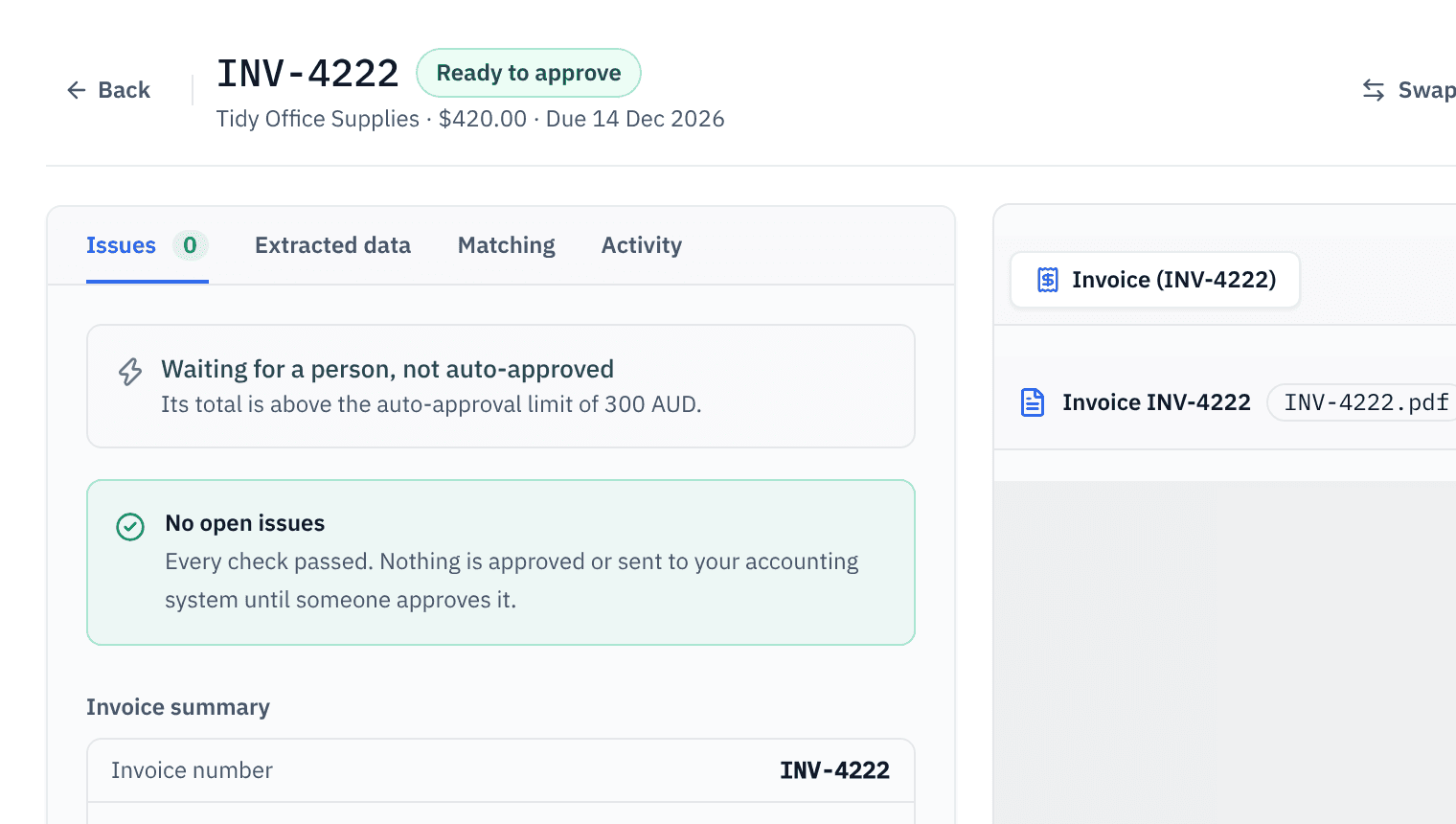
- A clean invoice that still waits for a person shows the reason.
In this guide
Most supplier invoices are routine: a known supplier, a small amount, every check passed. An approver who opens thirty of those to find the two that matter stops reading carefully. Auto-approval lets an admin set a policy for the routine ones, so that people see the exceptions. This post sets out exactly what the policy will and won't approve.
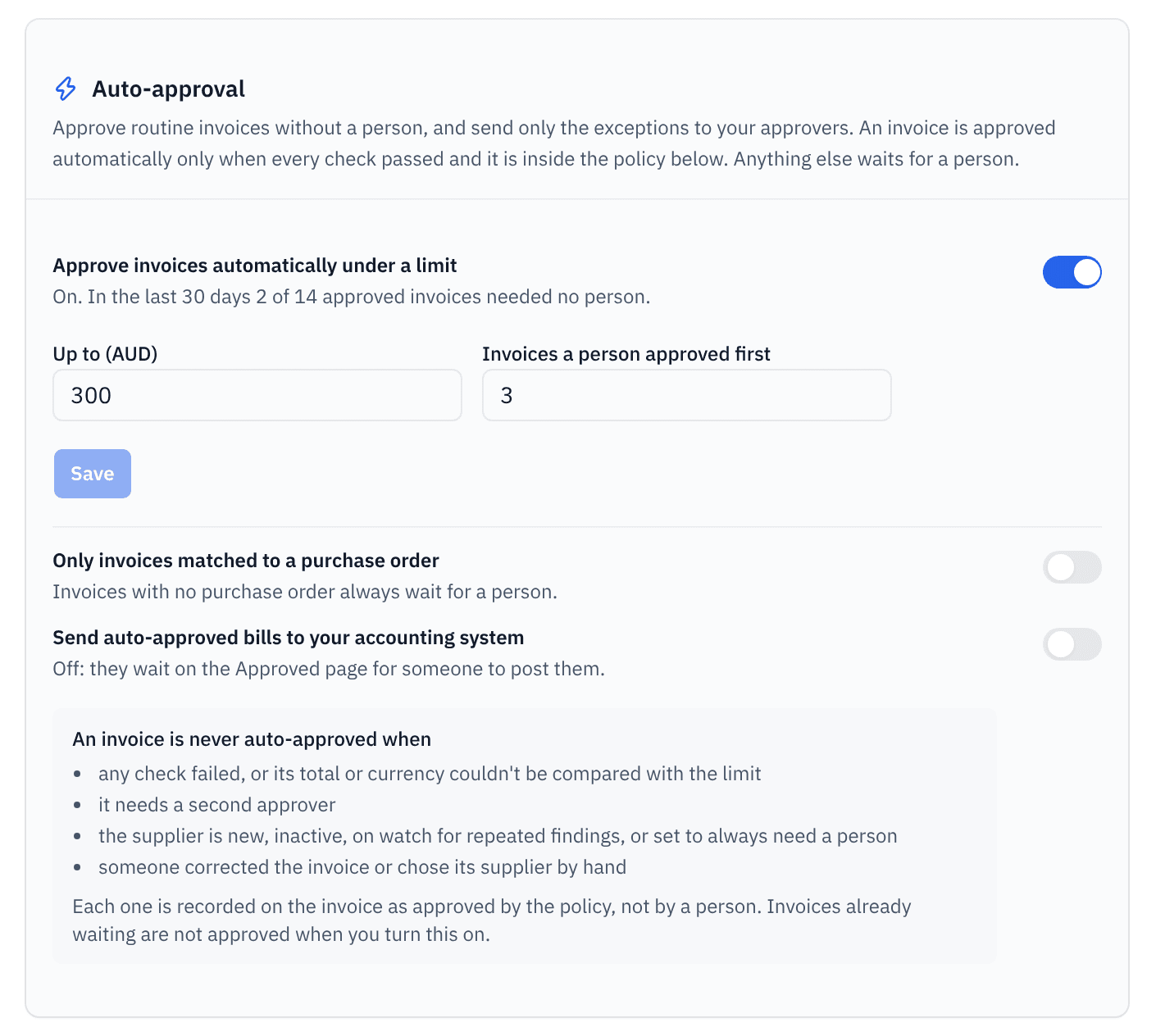
Under Settings, Controls, an admin turns on Auto-approval and sets an amount limit. From then on an invoice is approved by the policy only if every check passed, it is at or under the limit in your currency, it needs one approver, and its supplier is active, not on watch and already has invoices approved by a person. Everything else waits for a person, and each auto-approval is recorded as the policy's.
Turning it on
- Open Settings, then Controls, and switch on Approve invoices automatically under a limit.
- Set Up to, the largest invoice total the policy may approve, in your workspace currency.
- Set Invoices a person approved first: how many of a supplier's invoices a person must have approved before the policy will approve one. It starts at 3.
- Optionally switch on Only invoices matched to a purchase order, so that an invoice with no order always waits for a person.
- Optionally switch on Send auto-approved bills to your accounting system. Left off, they wait on the Approved page for someone to post them.
What the policy will approve
An invoice is approved by the policy only when all of these are true:
- Every check passed and it has no open issue.
- It is an ordinary bill from a matched, active supplier.
- Its total was read, is in the workspace currency, and is at or under the limit.
- It needs only one approver. If you require a second approver above an amount, those invoices always go to people.
- The supplier already has enough invoices approved by a person. Auto-approvals don't count, so the policy can't build its own history.
- The supplier is not on watch and is not set to always need a person.
- Nobody corrected the invoice or chose its supplier by hand.
- If the policy covers only invoices matched to a purchase order, it has a matched order.
What always goes to a person
- Any finding. A possible duplicate, a price above the order or the agreed price, a price rise, more billed than received.
- A new supplier, an inactive one, or one on watch because 3 or more of its last 10 invoices had a finding.
- An invoice in another currency, or one whose total couldn't be read.
- Anything a person changed. A correction that makes the checks pass has to be seen by an approver.
You can also keep one supplier out of the policy altogether: on its supplier page, switch on Always needs a person.
How it is recorded
An auto-approved invoice says so on its page. Its audit trail records the approval as the policy's, with the policy as it stood, and the note written on a QuickBooks bill says it was approved automatically under the auto-approval policy. It never carries a person's name.
A clean invoice that the policy left alone shows why, in one line: above the limit, a supplier without enough history, a second approver needed.
Before you turn it on
- Start low. Set a limit you would be comfortable not looking at, and raise it once the Insights page shows what the policy approved.
- Save your agreed prices first. The policy relies on the checks, and a supplier with no order and no agreed price has less to be checked against.
- It approves; it doesn't pay. Payment is still made in your accounting system or bank.
- There are no email alerts yet when an invoice is auto-approved. Use the Approved page and Insights to review them.
Conclusion
Auto-approval is a narrow door: small, clean invoices from suppliers a person has already approved. If you leave it off, nothing changes and every invoice waits for a person. For the supplier history the policy leans on, see supplier intelligence in Tenet. For reviewing the invoices it leaves for you, see reviewing a supplier invoice, step by step.
Common questions
Is auto-approval on by default?
No. It is off until an admin turns it on and sets an amount limit. Invoices already waiting when it is turned on are not approved by it.
Can an invoice with a failed check be auto-approved?
No. Every check must have passed and the invoice must have no open issue. Any finding, such as a duplicate or a price above the agreed price, sends it to a person.
Can a new supplier’s invoices be auto-approved?
No. A supplier needs invoices already approved by a person first: 3 unless you change the number. Auto-approvals don’t count towards it.
Could someone edit an invoice so that it passes and is auto-approved?
No. If a person corrected the invoice or chose its supplier by hand, the policy leaves it for an approver.
How do I see which invoices were auto-approved?
Each one says so on its page and in its audit trail, and the note written on a QuickBooks bill says it was approved automatically under the policy. The Insights page shows the share of invoices approved without a person.
Tenet checks every invoice, matches it to POs and goods receipts, and holds exceptions for your team.